
After several years of running a three-pack of Cisco Business CBW240AC 802.11ac access points, I decided it was time for an upgrade.
The Cisco 240ACs had served me well. They were reliable, offered good coverage throughout the house and, for their generation, delivered a solid wireless experience.
However, wireless technology has moved on considerably since I installed them.
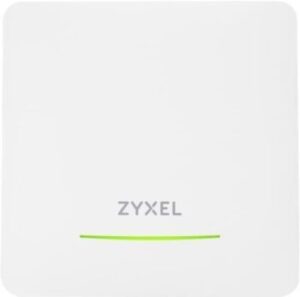
My old Cisco access points were based on Wi-Fi 5 (802.11ac), whereas my replacement is the Zyxel NWA50BE PRO, a Wi-Fi 7 access point capable of up to BE6500 / 6.5Gbps of aggregate wireless throughput and equipped with a 2.5GbE Ethernet interface.
Zyxel NWA50BE Pro Wi-Fi 7 Access Point
This is the access point I purchased and installed as part of my upgrade from the Cisco 240AC to Wi-Fi 7.
If you’re interested in the NWA50BE Pro, you can check the current price and availability on Amazon UK.
Affiliate Disclosure: This post contains Amazon affiliate links. If you purchase a product through one of these links, I may earn a small commission at no additional cost to you. I only recommend products that I have personally used or believe are worth considering.
But there was another reason this particular upgrade was interesting for me.
Stepping outside my comfort zone
As an Infrastructure Engineering professional, I’ve spent much of my career working with enterprise networking and infrastructure products.
Cisco, HPE, Aruba and other established enterprise vendors are the names I’m familiar with and, more importantly, the platforms I’ve trusted.
So when I started looking for a replacement for my Cisco access points, moving to Zyxel wasn’t an obvious decision for me.
I’ll be honest — I was nervous about it.
Zyxel is a brand I’d obviously come across before, but it wasn’t a vendor I had personally relied on in the same way I had relied on Cisco and HPE in professional environments.
I therefore spent quite a bit of time researching the NWA50BE PRO before making the decision.
I looked at the specifications, management platform, firmware support, security features, VLAN capabilities, PoE requirements, cloud management and, importantly, what the real-world experience was like for people actually using the hardware.
I also wanted to make sure that it would integrate properly with the network architecture I already had at home.
That meant considering how it would work alongside my pfSense firewall, my network segmentation, multiple SSIDs and existing PoE switching infrastructure.
There was a certain amount of hesitation before pressing the order button.
Would it feel like a step backwards coming from Cisco?
Would the management platform be good enough?
Would the firmware and support be there?
Would it actually perform as advertised?
These were all questions I had before making the switch.
As it turned out, I needn’t have worried.
The Zyxel NWA50BE PRO has genuinely surprised me.
In fact, after installing and configuring the three access points, I was amazed by how capable the product is.
The hardware feels well thought out, the management experience is straightforward and the performance has been excellent.
Most importantly, it doesn’t feel like I compromised by moving away from the enterprise vendors I’m accustomed to using.
If anything, the experience has made me reconsider where Zyxel fits into the networking market.
My Home Network Setup
Before looking at the access points themselves, it’s worth explaining how I’ve built my home network.
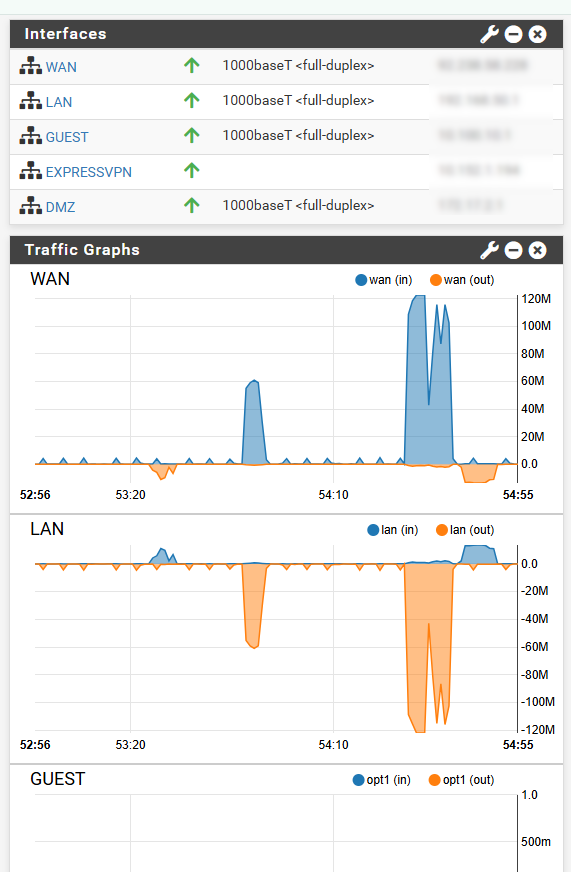
I’m a big believer in keeping the network properly segmented, even at home. Rather than putting every device onto a single flat network, I’m using my own custom pfSense firewall as the core of the network.
The wireless network is separated into two distinct environments:
- Trusted Network – for my own computers, phones, tablets and other trusted devices.
- Guest Network – completely separated from the trusted network and intended for visitors and devices that I don’t want on my primary LAN.
These are presented to wireless clients using two separate SSIDs.
My wireless setup
SSID 1 – Trusted
My primary wireless network for trusted devices.
SSID 2 – Guest
A separate guest network with restricted access to my trusted network.
The Zyxel access points are therefore not simply providing wireless connectivity. They are sitting within a properly segmented network architecture, with pfSense handling the routing, firewalling and network separation.
This is one of the reasons I particularly like using business-oriented networking equipment at home. It gives me the flexibility to build the network in the way I want rather than relying entirely on whatever functionality happens to be built into a consumer router.
What You Need for a Similar Home Network Setup
If you’re considering building something similar to my home network, here’s a rough idea of the equipment I’m using — or, more accurately, the type of equipment you would need.
It’s important to point out that my own hardware has been in use for several years, and some of the exact models I have are no longer readily available. Rather than recommending obsolete hardware, I’ve included links to current alternatives that are similar in terms of functionality and capability.
I’ve also deliberately gone for equipment that sits towards the higher end of what you might consider for a home network.
You absolutely don’t need to spend this much to get good Wi-Fi at home. There are plenty of cheaper alternatives available, particularly if you don’t need VLANs, multiple SSIDs, PoE or advanced firewall functionality.
However, if you’re interested in building a network similar to mine, these are the types of components I’d look at.
🛜 Wi-Fi Access Points
The most important part of my upgrade is the three Zyxel NWA50BE PRO Wi-Fi 7 access points.
I’m using three APs to provide coverage throughout my home, with the APs connected back to my wired network using Ethernet and powered via PoE.
Zyxel NWA50BE PRO BE6500 Wi-Fi 7 Access Point
As an Amazon Associate, I earn from qualifying purchases.
The three APs are configured to provide both my trusted and guest SSIDs, with the underlying network segmentation handled by pfSense.
🔥 Firewall / Router
For the firewall, I’m using my own custom pfSense installation.
This is probably the component that makes my setup more advanced than a typical home network.
pfSense gives me the ability to create separate networks, VLANs, firewall rules and policies rather than relying on the basic functionality built into a typical ISP router.
If you’re looking to replicate this part of my setup, you’ll need suitable hardware capable of running pfSense.
Custom Firewall Appliance
A compact firewall appliance that can be used for home networking, lab environments and OPNsense, pfsense or other firewall deployments.
As an Amazon Associate, I earn from qualifying purchases.
You don’t necessarily need an expensive appliance. There are plenty of options available, including relatively inexpensive hardware that can run pfSense very well.
The important thing is to make sure the hardware has the interfaces and performance you need for your Internet connection and network design.
🔌 PoE Network Switch
Because I’m running three ceiling/wall-mounted access points, I wanted to avoid having separate power supplies for each AP.
That’s where Power over Ethernet (PoE) comes in.
My own setup uses a Cisco SG300-10PP and an HPE Aruba 2530-24G-PoEP (J9773A).
Both are older pieces of hardware that I’ve had for years, and neither is something I’d necessarily recommend buying new today.
Instead, I’d look for a current PoE switch with enough ports and, importantly, enough PoE power budget to support the number of access points and other devices you intend to connect.
Managed PoE Switch Options
If you’re looking to build a similar setup, here are two managed PoE switch options worth considering.
Cisco Catalyst 1200
A compact managed PoE switch suitable for powering access points and other network devices.
Check Price on Amazon UKAruba Instant On 8-Port PoE
An alternative managed PoE switch suitable for home networks, small businesses and home lab environments.
Check Price on Amazon UKAs an Amazon Associate, I earn from qualifying purchases.
Before buying, check the switch specifications carefully. Make sure it supports the PoE standard required by your access points and that the total PoE budget is sufficient.
There’s nothing worse than buying a PoE switch with plenty of ports only to discover that it doesn’t have enough power available to run everything connected to it.
🌐 Networking / Ethernet
You’ll obviously also need suitable Ethernet cabling and, depending on your setup, potentially additional networking hardware.
My APs are connected using Ethernet back to the switching infrastructure, rather than relying on wireless mesh.
For a new installation, I’d recommend considering Cat6 or better cabling, particularly if you’re installing new cable runs.
This gives you a good foundation for future network upgrades.
CAT6 Ethernet Cable
CAT6 Ethernet cable suitable for connecting access points, switches and other wired network equipment.
As an Amazon Associate, I earn from qualifying purchases.
A word of caution before you buy
The equipment listed above represents a higher-end home networking setup.
It’s very similar in philosophy to the infrastructure I use at home, but that doesn’t mean it’s the right solution for everyone.
If all you need is reliable Wi-Fi for a few phones, laptops and streaming devices, you probably don’t need a dedicated pfSense firewall, managed PoE switches and multiple business-class access points.
There are considerably cheaper ways of achieving that.
The reason I’ve gone down this route is that I enjoy networking, I have an Infrastructure Engineering background and I wanted the flexibility to build and manage my own network.
I’ve also accumulated much of my existing infrastructure over a number of years, rather than purchasing everything at once.
My advice is to research before buying.
Don’t simply buy the most expensive equipment you can find.
Think about:
- How many devices you have
- How much Wi-Fi coverage you need
- Whether you need multiple SSIDs
- Whether you need VLANs
- Whether you need guest network isolation
- Whether you need PoE
- What speed your Internet connection provides
- Whether your switches support that speed
- Whether your wireless clients support 5GHz, 6GHz or Wi-Fi 7
- Whether your firewall hardware can handle your Internet connection
- How much room you want for future expansion
Most importantly, check compatibility between the different components before buying.
A more expensive access point isn’t necessarily going to give you better performance if your switch, firewall, cabling or client devices become the bottleneck.
Likewise, buying a 2.5GbE access point doesn’t mean you’ll automatically benefit from 2.5Gbps if the rest of your network is still Gigabit Ethernet — something I’m deliberately accepting with my own setup because I’m planning for future upgrades.
The links above are therefore examples of the type of equipment I’d consider rather than a statement that everyone should buy exactly the same hardware.
Powering the Access Points
I’m also using existing PoE switching infrastructure to power all three Zyxel access points.
The three APs are connected to:
- Cisco SG300-10PP
- HPE Aruba HP 2530-24G-PoEP (J9773A)
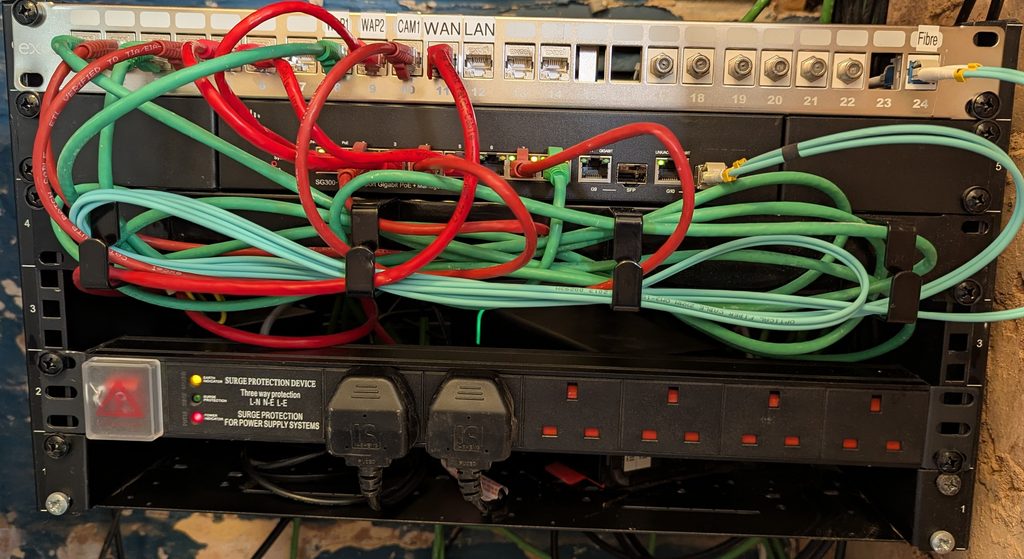
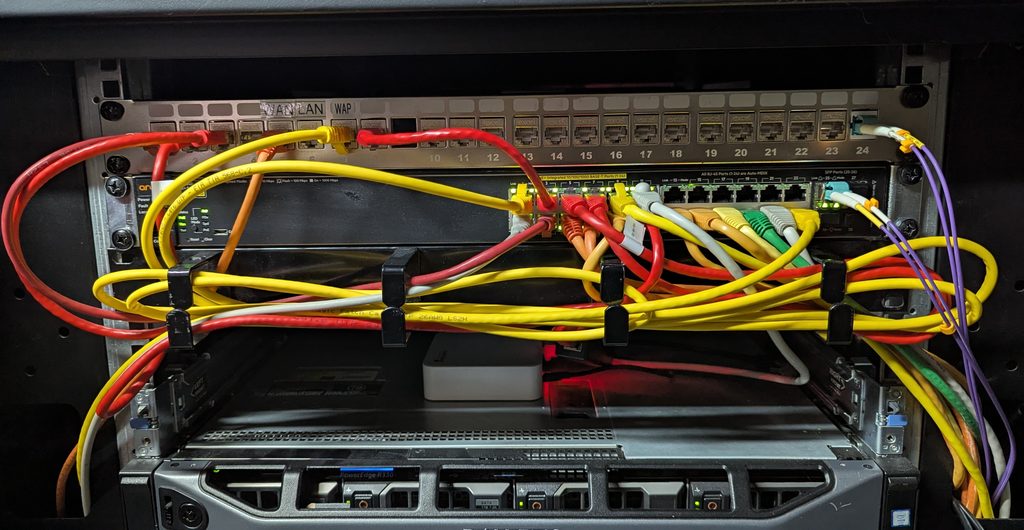
Both switches provide PoE, meaning I don’t need separate power supplies at each access point.
This makes the installation considerably cleaner.
The topology is essentially:
Internet → pfSense Firewall → Switching Infrastructure → Zyxel NWA50BE PRO APs
with the wireless networks being separated into the trusted and guest environments.
Having PoE available was particularly useful when replacing the Cisco access points because I could essentially swap the hardware without having to change the physical infrastructure around it.
The Cisco 240AC was actually a good access point
Before getting into the Zyxel, it’s worth saying that the Cisco Business 240AC wasn’t a bad product.
Quite the opposite.
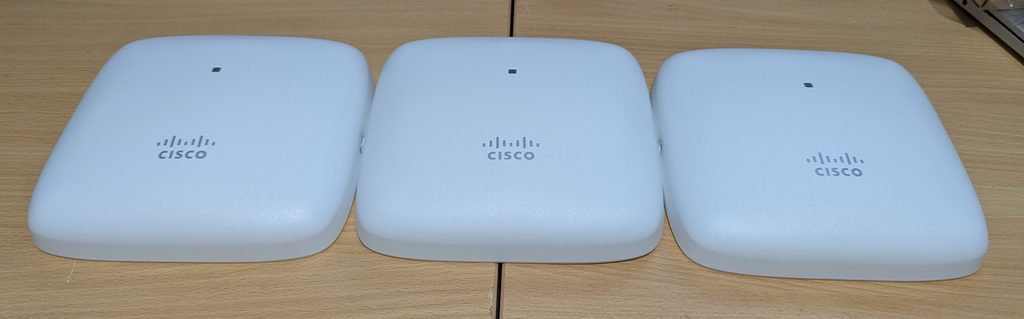
My three access points had served me well. They provided reliable wireless coverage throughout the house and, once configured, generally just got on with the job.
However, there was one limitation that had become increasingly noticeable: the Cisco 240ACs couldn’t deliver the full 1Gbps speeds available from my network connection.
Even though my Internet connection is capable of 1Gbps, the maximum real-world wireless speeds I was seeing through the Cisco access points were below that.
This wasn’t necessarily a problem with the Cisco 240AC itself. Wi-Fi 5 was designed for a different generation of devices and Internet connections, and achieving a full 1Gbps of usable throughput over wireless is considerably more demanding than simply having a Gigabit Ethernet port.
The difference became much more obvious after installing the Zyxel NWA50BE PRO.
With its Wi-Fi 7 radios and 2.5GbE Ethernet interface, the Zyxel is capable of delivering considerably higher real-world wireless throughput.
In my setup, I’m now able to get much closer to the full 1Gbps Internet speed over Wi-Fi, something I simply wasn’t achieving consistently with the Cisco access points.
That’s probably one of the biggest practical improvements I’ve noticed since making the switch.
The Cisco 240ACs were still perfectly usable, but they had effectively become a bottleneck for my faster Internet connection.
The Cisco 240AC has also now reached end-of-sale, making this a good time to move to a current-generation platform rather than continue investing in ageing Wi-Fi 5 hardware.
Enter the Zyxel NWA50BE PRO
My replacement is the Zyxel NWA50BE PRO BE6500 Wi-Fi 7 Access Point.
On paper, it’s a significant jump.
The NWA50BE PRO supports:
- Wi-Fi 7 / IEEE 802.11be
- Up to 6.5Gbps aggregate wireless throughput
- 2.4GHz and 5GHz or 6GHz operation
- 4-stream architecture
- Multi-Link Operation (MLO)
- Smart Mesh
- WPA3
- PoE+
- 2.5GbE Ethernet connectivity
- Nebula cloud or standalone management
That flexibility was particularly attractive to me.
I don’t necessarily want to introduce a complicated controller or another appliance into my home network just to manage three access points.
Installation was surprisingly easy
One of the first things I noticed was how straightforward the physical installation was.
The access points can be wall or ceiling mounted, and they can be powered using PoE.
Because my existing network already has PoE switching through the Cisco SG300-10PP and HPE Aruba 2530-24G-PoEP, installation was essentially a case of removing the Cisco APs and connecting the Zyxel units.
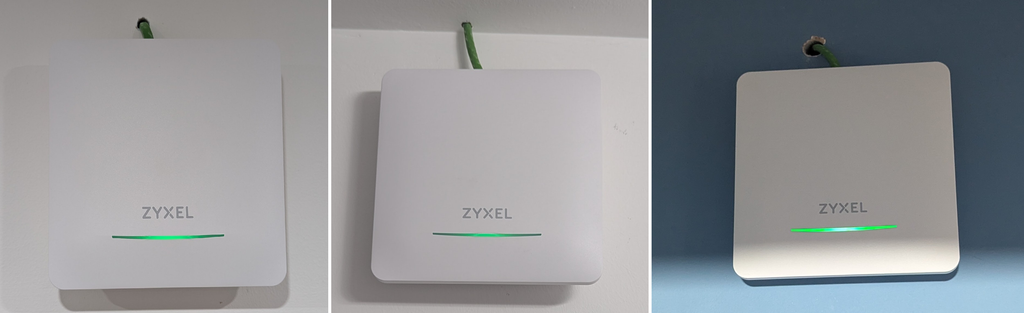
No separate power bricks.
No additional power cabling.
No major changes to the network infrastructure.
Just:
Ethernet → PoE switch → Zyxel AP
This is exactly how I like networking equipment to be installed.
Nebula makes management much easier
One of the biggest differences compared with my previous setup is the management experience.
The NWA50BE PRO supports Zyxel NebulaFlex, giving you the choice of managing the access point locally or through the Nebula cloud platform.
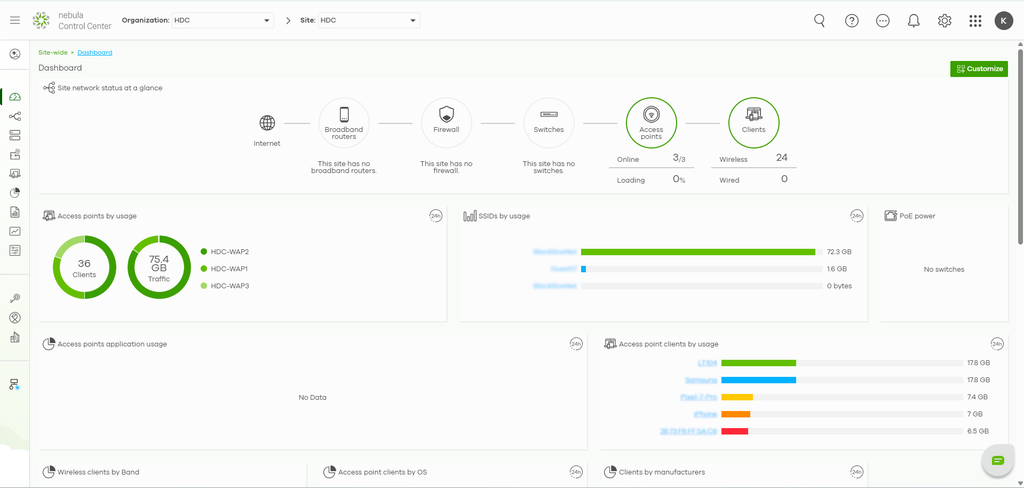
The initial setup through Nebula is particularly straightforward.
Once the access points are registered, I can manage all three from the same interface rather than having to configure each AP individually.
For a three-AP deployment like mine, that makes a noticeable difference.
I can make changes centrally and monitor the wireless infrastructure without having to physically connect to each access point.
Coming from an Infrastructure Engineering background, I’m used to management platforms being powerful but sometimes complicated.
Nebula has been a pleasant surprise.
It gives me the visibility and control I want without making the configuration unnecessarily difficult.
Wi-Fi 7 is the biggest upgrade
Of course, the main reason for upgrading was performance.
The Cisco 240AC was based on Wi-Fi 5.
The Zyxel is Wi-Fi 7.
Wi-Fi 7 introduces technologies designed to improve throughput, latency and reliability. One of the most interesting is Multi-Link Operation (MLO), which allows compatible clients to make use of multiple wireless links.
In practical terms, this gives the network considerably more headroom for newer devices.
Of course, there’s an important caveat:
You don’t automatically get 6.5Gbps on your phone or laptop just because the access point is labelled BE6500.
Actual performance depends on the client device, channel width, signal strength, interference and the capabilities of the rest of the network.
But that’s not really the point.
The benefit is having a much more capable wireless platform that isn’t going to become the bottleneck as newer devices arrive.
One important consideration: 5GHz vs 6GHz
There is one important consideration with the NWA50BE PRO that I think is worth mentioning, particularly if you’re upgrading from older Wi-Fi equipment.
The NWA50BE PRO is a dual-radio access point, with one radio dedicated to 2.4GHz and the second radio configurable for 5GHz or 6GHz.
That sounds perfectly reasonable when you look at the specifications, but it does create an interesting consideration if you have a mixture of older and newer wireless devices.
A lot of the devices I have around my home still support 2.4GHz and 5GHz, but don’t support 6GHz.
If I configure an AP’s second radio for 6GHz, those older 5GHz-only devices obviously can’t connect to that radio. They can still connect to the 2.4GHz network, but that can result in significantly lower throughput compared with a good 5GHz connection.
This is something that isn’t necessarily obvious when you see “Wi-Fi 7” and “6GHz” on the specification sheet.
The reality is that not all of my devices are Wi-Fi 7 or even Wi-Fi 6E capable.
I have a mixture of newer and older devices, and I still want the older devices to get the best performance they can.
My solution
For the time being, I’ve decided to configure my three access points slightly differently.
AP 1:
- 2.4GHz
- 5GHz
AP 2:
- 2.4GHz
- 6GHz
AP 3:
- 2.4GHz
- 6GHz

This gives me the best compromise for my current collection of devices.
The first access point provides both 2.4GHz and 5GHz, ensuring that my older 5GHz-capable devices still have access to a dedicated 5GHz radio.
The other two APs use 2.4GHz and 6GHz, allowing my newer Wi-Fi 6E and Wi-Fi 7 devices to take advantage of the 6GHz spectrum.
This does mean that I’m not running an identical radio configuration across all three APs, but for my particular environment I think that’s a sensible compromise.
It also demonstrates something I’ve learned from this upgrade:
Having the latest wireless technology doesn’t necessarily mean configuring everything for the latest technology.
You need to consider the devices that are actually using the network.
A Wi-Fi 7 access point might be capable of amazing speeds on 6GHz, but if half of your devices only support 5GHz, putting all your APs into a 2.4GHz + 6GHz configuration could actually result in a worse experience for those older clients.
For my network, having one AP dedicated to supporting the 2.4GHz + 5GHz combination means my older devices can still get the faster 5GHz connectivity they need, while the other two APs provide 6GHz connectivity for newer devices.
As I gradually replace older devices with Wi-Fi 6E and Wi-Fi 7 capable hardware, I can revisit this configuration.
For now, this gives me the best balance between compatibility and performance.
And this is exactly the sort of thing I think is worth considering before upgrading to Wi-Fi 7. Don’t just look at the headline speed or the latest wireless standard — look at the devices you actually have in your home.
The 2.5GbE port is important
Another upgrade that I particularly like is the move from Gigabit Ethernet to 2.5GbE.
There’s little point having a modern Wi-Fi 7 access point capable of multi-gigabit wireless speeds if the wired connection back to the network is limited to 1Gbps.
The NWA50BE PRO therefore includes a 2.5GbE Ethernet interface.
At the moment, I’m not actually benefiting from the full 2.5GbE capability, as my current switching infrastructure is still Gigabit Ethernet. So I’m not going to pretend that I’m currently transferring data at 2.5Gbps!
However, I see this as a positive rather than a limitation.
The access points are now ready for the future.
When I eventually upgrade my switching infrastructure to 2.5GbE or faster, I won’t need to replace the access points again just to take advantage of the faster network.
For me, that’s an important part of future-proofing the network. I’m upgrading the wireless infrastructure now while knowing that the wired infrastructure can be upgraded later.
It also means that the 1GbE limitation isn’t built into the access points themselves. The bottleneck currently sits elsewhere in my network, and that’s something I can address when I decide the time is right.
A 1Gbps network is still more than enough for my current requirements, so there’s no reason for me to replace perfectly good switching hardware simply to achieve a specification on paper.
Instead, I’ve taken a more gradual approach:
Wi-Fi 5 → Wi-Fi 7 now
1GbE → 2.5GbE switching when required
That gives me a modern wireless platform today while leaving a clear upgrade path for the future.
Trusted and Guest Wi-Fi
The ability to create separate SSIDs works particularly well with my pfSense setup.
My two SSIDs map to the separate trusted and guest environments, with pfSense handling the network routing and firewall policies.
This means I can allow trusted devices to access the resources they need while keeping guest devices isolated from my internal network.
For example, a guest connecting to the guest SSID doesn’t need — and shouldn’t have — access to my computers, NAS devices, printers or other trusted equipment.
For me, wireless isn’t just about speed.
Security and segmentation are equally important.
Support and product lifecycle
Another factor I considered was support.
Networking equipment isn’t something I want to replace every couple of years.
The NWA50BE PRO is a current Wi-Fi 7 product, and Zyxel continues to provide firmware, documentation and support for the platform.
That gives me considerably more confidence that I’m investing in a platform that still has plenty of life ahead of it.
The ability to manage the access points through Nebula is another benefit, particularly when running multiple APs.
The biggest improvements so far
After making the switch, the improvements aren’t just about having the latest Wi-Fi standard.
For me, the biggest improvements are:
🚀 Wi-Fi 7
A significant generational jump from the Wi-Fi 5 technology used by the Cisco 240AC.
⚡ Getting much closer to 1Gbps over Wi-Fi
This is probably the most noticeable real-world improvement.
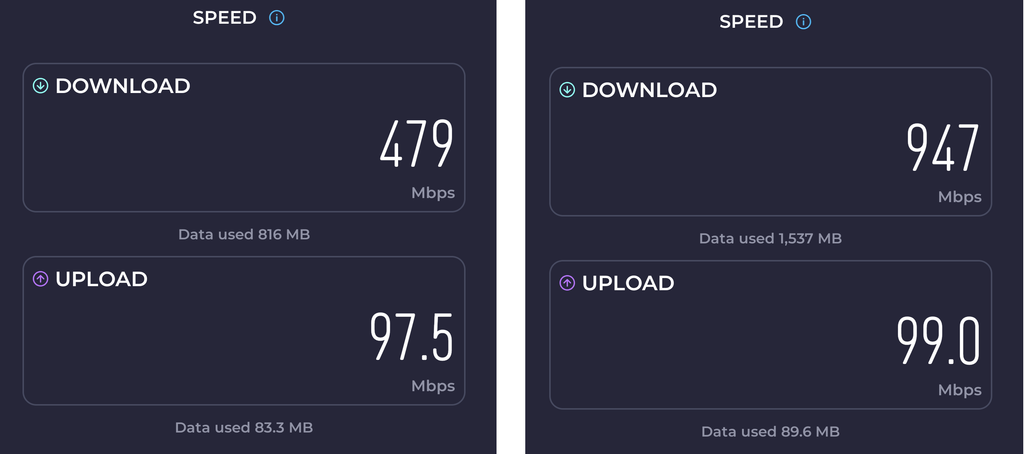
With the Cisco 240ACs, I wasn’t able to make full use of my 1Gbps Internet connection over Wi-Fi.
The Zyxel NWA50BE PRO has made a significant difference. With its Wi-Fi 7 capability and 2.5GbE uplink, I’m now able to get much closer to the full 1Gbps available from my Internet connection.
For me, that’s a much more meaningful improvement than simply seeing “Wi-Fi 7” on the specification sheet.
🔌 2.5GbE
The Zyxel’s 2.5GbE interface removes the 1GbE limitation at the access-point level and gives the wireless network much more headroom for the future.
☁️ Centralised cloud management
Nebula makes managing all three access points straightforward without needing a dedicated wireless controller.
🔐 Network segmentation
Using the Zyxel APs with my pfSense firewall allows me to maintain separate trusted and guest wireless networks.
🔧 Easier deployment
PoE makes installation clean and simple. My existing Cisco and HPE Aruba PoE switches meant that all three access points could be powered directly over Ethernet.
📱 Modern client support
Newer phones, laptops and other Wi-Fi 6E/7 devices can take advantage of the newer wireless technologies, while my 5GHz-capable legacy devices can still be supported through the mixed AP configuration.
🔄 Future-proofing
I’m now starting from a modern Wi-Fi 7 platform rather than continuing to invest in Wi-Fi 5 hardware.
Was it worth upgrading?
For me, absolutely.
The Cisco 240ACs weren’t failing, and I wasn’t experiencing any major wireless problems. They were reliable and did exactly what I needed them to do for several years.
However, they had reached the point where they were becoming a limitation.
The upgrade to the Zyxel NWA50BE PRO has addressed that while also giving me:
- Wi-Fi 7
- 2.5GbE connectivity
- Better support for modern clients
- Centralised cloud management
- PoE+
- Modern security features
- Greater wireless capacity
- A current-generation platform
And I haven’t had to redesign my network to achieve it.
My existing pfSense firewall, network segmentation and PoE switching infrastructure all continue to work exactly as intended.
Who is the NWA50BE PRO for?
Based on my experience, I’d consider the NWA50BE PRO if you:
- Are upgrading from Wi-Fi 5 or older equipment
- Have Wi-Fi 6E or Wi-Fi 7 devices
- Want to take advantage of 6GHz connectivity
- Want centrally managed access points
- Have, or plan to add, PoE to your network
- Want 2.5GbE connectivity for additional network headroom
- Have a home lab or more advanced home network
On the other hand, it may be more than you need if you:
- Only have a few basic wireless devices
- Don’t have any Wi-Fi 6E or Wi-Fi 7 clients
- Don’t need multiple SSIDs
- Don’t need VLANs or advanced networking features
- Have no plans to move beyond Gigabit networking
If you’re simply looking for basic Wi-Fi coverage, there are cheaper options available. But if you’re building a more capable home network and want the flexibility to take advantage of newer Wi-Fi standards and multi-gigabit networking, I think the NWA50BE PRO is worth considering.
Perhaps the biggest surprise for me has been how comfortable I’ve become with the Zyxel platform.
Coming from an Infrastructure Engineering background where Cisco, HPE and Aruba have been my normal choices, I genuinely expected that moving to a different vendor would involve some compromises.
Instead, the opposite has happened.
Zyxel has genuinely impressed me.
Final thoughts
Replacing three perfectly functional access points isn’t always an easy decision.
The Cisco 240ACs served me well, but technology has moved on.
The move to the Zyxel NWA50BE PRO has changed that.
Moving from Wi-Fi 5 to Wi-Fi 7, 1GbE to 2.5GbE, and a traditional small-business wireless setup to Nebula cloud management has made a noticeable difference in everyday use.
The biggest thing for me isn’t the headline BE6500 specification or simply being able to say that I now have Wi-Fi 7.
It’s the fact that I’m finally able to make much better use of the full 1Gbps Internet connection over Wi-Fi.
At the same time, I haven’t sacrificed the network architecture I already had.
My custom pfSense firewall continues to provide the core routing and firewall functionality, my trusted and guest networks remain segregated, and the three Zyxel APs are powered directly from my existing Cisco SG300-10PP and HPE Aruba 2530-24G-PoEP switches.
But perhaps the biggest lesson for me has been that sometimes it’s worth stepping outside your comfort zone.
I went into this upgrade with reservations about moving away from the enterprise vendors I normally use professionally.
I did the research, I compared the options and I had my doubts.
After deploying the three NWA50BE PROs, those doubts disappeared pretty quickly.
I was genuinely amazed by the product.
The Cisco 240ACs were good access points. They weren’t broken, unreliable or in desperate need of replacement.
They had simply reached the point where newer wireless technology could offer a significantly better experience.
The Zyxel NWA50BE PRO has given me better wireless performance, 2.5GbE connectivity, modern Wi-Fi 7 features, easy management and a platform that integrates nicely with the infrastructure I’ve already built.
And that, for me, made the upgrade worthwhile.
Cisco 240AC → Zyxel NWA50BE PRO
Wi-Fi 5 → Wi-Fi 7
1GbE → 2.5GbE
Sub-1Gbps Wi-Fi → Much closer to full 1Gbps Wi-Fi
Traditional management → Nebula
Enterprise-only mindset → A surprisingly impressive Zyxel experience
Sometimes an upgrade really is worth it.