
Part 7: Putting RPCS3 Through Its Paces
Everything up to this point — the hardware, the OS, the storage, the controllers — has been building toward this. This is the part where I find out whether the OptiPlex is actually capable of what I set out to build it for.
A quick scope note before diving in: most of this part covers the PS3 titles I’ve spent the most time with via RPCS3, since that’s where the bulk of the troubleshooting and configuration work has happened. There’s also a first look at Xbox 360 emulation via Xenia toward the end, covering the two titles I’ve gotten working properly so far.
(A note on the games themselves: every title named below is one I own — see Part 1 for the full note on that.)
The Baseline Settings
Before getting into individual games, it’s worth covering the general RPCS3 configuration I’m starting every title from, since most of what follows is either “this works fine on the baseline” or “here’s what needed to change from it.”
- Renderer: Vulkan (not OpenGL) — better performance and correct visuals across the board on this hardware
- PPU Decoder / SPU Decoder: Recompiler (LLVM) for both — essential for playable speed on a CPU-bound emulator like this
- Shader Mode: Async with Shader Interpreter — compiles shaders in the background rather than freezing gameplay when new effects first appear, which is the single biggest fix for stutter-then-smooth judder
- Resolution scale: kept close to native (100–150%) rather than pushed high, since the RTX 3050 is a modest card and the PCIe x4 link discussed in Part 3 means oversampling has a real bandwidth cost, not just a GPU one
Every game below starts from this baseline, and I’ll only call out what changes from it.
Burnout Paradise
Compatibility status: Playable — no reported issues, no deviation from default settings recommended.
This one is about as clean as PS3 emulation gets. It’s a 2008 launch-era title, nowhere near as CPU-demanding as some of what’s below, and it just runs.
In my own testing, frame rate held between 30–60fps depending on the scene — consistent with what a fairly light, launch-era PS3 title should give on this hardware.
The one thing that wasn’t perfectly clean was audio — there’s some slight crackling that’s audible in the gameplay video above, which may need further tweaking to fully resolve. The community-reported fix for audio issues in this title is adjusting the Audio Buffering duration in RPCS3 rather than touching CPU/GPU settings, so that’s the next thing I’ll try if it doesn’t clear up on its own.
The one thing worth documenting here isn’t really about the game itself — it’s the diagnostic process I went through after a crash, since it’s a useful general troubleshooting checklist for RPCS3 on this specific machine:
- Check the RPCS3.log for the actual failure — this is the fastest way to know what you’re actually dealing with rather than guessing
- Suspect the PSU under sustained load — the 240W supply discussed in Part 2 is a real candidate for instability under combined CPU+GPU load, particularly since a full app crash (not a graphical glitch) is a classic symptom of power delivery issues rather than an emulator bug
- Check the NVMe cache partition isn’t full — a full partition can cause RPCS3 to crash rather than fail gracefully when it can’t write new shader data
- Rule out a mount race condition — if the custom service from Part 5 mounts a beat too late, RPCS3 can create its cache folder on the boot drive first, then have it “disappear” underneath it
- Check for leaked per-game settings — a setting toggled for a troublesome title elsewhere (Strict Rendering, a nonstandard SPU Block Size) can destabilise an otherwise well-behaved game if it ends up saved globally instead of per-game
- Watch temps during play — a discrete GPU in a tightly packed SFF case can run hotter than expected
Red Dead Redemption
Known as one of the more demanding titles on RPCS3, and the one that showed the most judder on this hardware.
The i7-8700’s 6 cores sit right at the community-recommended minimum for RDR, so some judder in dense open-world areas is expected even with ideal settings — this is a case of getting close to this hardware’s ceiling, not fixing a misconfiguration.
What actually helped:
- SPU Block Size: Safe, not Mega or Giga — RDR’s audio engine is unusually SPU-heavy, and the faster block sizes cause audio dropout and world-streaming glitches specifically in this game
- Async shader compilation (from the baseline) doing a lot of the heavy lifting here, since shader stutter is otherwise very noticeable in a game this visually varied
- Resolution scale kept near native, for the PCIe bandwidth reasons covered in Part 3
In practice, this was the roughest result of the whole testing run. Performance is fine in quieter areas, but it judders noticeably in the more built-up parts of the map, with frame rate dropping to around 12–15fps at most in those sections. That’s well below the 30–45fps I’d expected going in based on community benchmarks for similarly specced systems — a clear sign this particular hardware combination, and specifically the CPU, is genuinely struggling with RDR’s busier scenes rather than just showing minor judder.
Assassin’s Creed II
Compatibility status: Ingame (not Playable) — a genuine regression, down from Playable in 2022.
This is the title that best illustrates the difference between a config problem and an actual unresolved emulator bug. There are documented, persistent graphical artifacts (broken water textures, horizontal lines) that show up even with every recommended fix applied, alongside intermittent crashes.
What I tried:
- Force CPU Blit Emulation (Debug tab) — the one officially documented fix, needed to keep the Gondola sequence in Firenze/Venezia controllable
- Strict Rendering Mode — reduces crash frequency at a real performance cost, doesn’t eliminate the visual bugs
- Updated community patch database via RPCS3’s Patch Manager — several Assassin’s Creed titles have had game-specific patches published for exactly this kind of issue
- Checked RPCS3 build version, since this title’s status has flipped between Playable and Ingame across different RPCS3 releases
Despite that Ingame status and the documented issues elsewhere, my own experience with it was genuinely good: a stable 30fps throughout, with no crashes and no visible artifacts during my playtime. Worth taking that as a “your mileage may vary” data point rather than a contradiction of the wider compatibility notes above — specific hardware, drivers and build versions can all shift where an individual game lands within its documented issues, and in this case I came out ahead of what the compatibility list would suggest.
God of War III
Compatibility status: Not considered Playable.
Another title where managing expectations matters as much as the settings themselves.
What’s needed:
- SPU Block Size: Safe — the officially recommended setting for this specific title
- Write Color Buffers: On — required, not optional, without it certain sections are missing geometry entirely
I also checked the Patch Manager for optional community fixes to some remaining visual artifacts, though those are treated as experimental extras rather than part of the core recommended setup.
In practice, this landed around 20–30fps during gameplay — not a locked frame rate by any means, but it played very well overall despite the “Not Playable” label. Genuinely one of the more pleasant surprises of this testing run given where it sits on the official compatibility list.
Army of TWO: The Devil’s Cartel
Compatibility status: Ingame — the roughest title I’ve tested so far.
This one has a known, currently unresolved RSX rendering bug: a severe green lighting artifact covering half the screen, tracked as an open issue on RPCS3’s GitHub.
Worth knowing before troubleshooting this one: the community patches that exist for this game (Disable MLAA, Disable Bloom, a green-artifact fix) are documented for the Demo release specifically, not the full retail game — so they may not apply cleanly.
In my own testing, this was the one title I didn’t push further with. What I saw was straightforwardly unplayable — so rather than working through every possible mitigation, I called it there. For anyone who wants to push further than I did, it’s worth trying:
- Toggling Write Color Buffers — the most likely candidate for affecting lighting bugs generally, even without official confirmation for this specific title
- Strict Rendering Mode — worth testing for the same reason as AC2 above
- Rechecking the patch database periodically for full-game-targeted patches
- Staying on the latest nightly build, since rendering fixes for specific titles land in nightlies before they reach stable releases
This is the one title in this build where I’d genuinely say: don’t expect it to be fixable through settings alone right now. It’s waiting on emulator-side progress, not configuration.
Army of TWO: The 40th Day
Compatibility status: Playable — the most stable of the three Army of Two titles.
A much better story than Devil’s Cartel:
- Unlock FPS patch (via Manage Game Patches) — the game caps at 30fps by default via VBlank, causing edge shimmering/flickering
- VBlank Rate: 120 (Config → Advanced) — combined with the Unlock FPS patch, this gets a genuine 60fps rather than the default 30, and fixes the shimmering as a side effect
- Some missions run bloom too bright with occasional green/red character tinting — a cosmetic quirk of this title on RPCS3, not something settings can fully correct
- Worth avoiding online/Versus menus, since EA’s servers for this game are long shut down and there are recent open bug reports tied to those specific menus
In my own testing, there was some judder during the startup video specifically, but once actual gameplay began it ran smoothly and consistently — worth knowing so that early judder doesn’t get mistaken for a sign the rest of the session will be rough.
One thing worth flagging if you try this: raising VBlank away from default has occasionally reintroduced threading deadlocks in other titles that rely on precise timing — the Assassin’s Creed series above is a known example — so it’s worth reverting first if new freezing shows up after a change like this elsewhere.
Prince of Persia: The Forgotten Sands
Compatibility status: Playable — no reported issues, no deviation from default settings recommended.
The easiest title in this whole testing run. Runs cleanly on the baseline settings above with nothing game-specific required.
In my own testing this held a stable 30fps throughout, matching its clean compatibility status exactly.
Genuinely useful as a contrast point against the rest of this list — not every PS3 title on RPCS3 needs troubleshooting, and it’s worth remembering that before assuming every game will need the same amount of work as the trickier ones above.
The Easy Wins: Tekken 6, Super Street Fighter IV and TMNT: Turtles in Time Re-Shelled
Alongside everything above, I also tried a handful of other titles that ended up needing zero troubleshooting at all: Tekken 6, Super Street Fighter IV, and — a personal childhood favourite — Teenage Mutant Ninja Turtles: Turtles in Time Re-Shelled.
All three are officially rated Playable on RPCS3, and all three ran perfectly here too, at a stable 60fps with no configuration beyond the baseline settings. Fighting games and side-scrolling beat-’em-ups like these are far lighter on the CPU than the open-world and action titles making up most of this testing run, and it shows — this is exactly the kind of result that’s easy to take for granted after spending so much time troubleshooting the trickier titles above.
Gran Turismo 6
Compatibility status: known to have multiple documented, unresolved graphical issues.
GT6 needed the most specific, non-obvious configuration of anything tested so far.
- Write Color Buffers: Off — this is the direct trigger for screen flickering in this title, needs to stay off
- Force CPU Blit Emulation: On (Debug tab) — compensates for WCB being off, so 2D elements and certain effects still render correctly
- SPU Decoder: switch to ASMJIT (from LLVM) if hard crashes show up alongside the flicker — a separate, documented stability fix
- Car reflections and anti-aliasing (MLAA) remain broken across every settings combination tried by the community — an open emulator bug, not something configurable away
- If flicker persists, this title has a known regression history tied to specific RPCS3 build ranges — v0.0.34 is commonly cited as a solid baseline if a recent nightly is still causing problems
Despite the settings above, this one was unplayable for me due to the screen flicker — it wasn’t something I could configure away in practice, matching the wider community reports of this being a persistent, unresolved issue rather than a simple misconfiguration.
Does the PCIe x4 Slot Actually Matter Here?
Worth circling back to the slot discovery from Part 3 now that there’s real testing to weigh it against.
The picture is more nuanced than I expected going in. Titles that are light on texture streaming and asset movement — Tekken 6, Super Street Fighter IV, TMNT, Burnout Paradise, even God of War III — all performed well, which suggests the x4 link isn’t a blanket problem for this card. But RDR’s real-world result (12–15fps in busy areas) is considerably worse than typical benchmarks for a similarly specced CPU would suggest on their own, and RDR is exactly the kind of open-world, heavy-streaming title we flagged in Part 3 as most likely to expose a bandwidth-constrained link. I can’t rule out the x4 slot compounding the CPU bottleneck specifically in RDR’s busiest scenes, even though the link tested healthy at full Gen 3 speed under load.
Put simply: for most of this library, the x4 slot hasn’t been the limiting factor. For the single most demanding title tested so far, it’s a real, open question rather than something I can confidently dismiss.
Xbox 360 Testing: Halo 3 and Gears of War 3
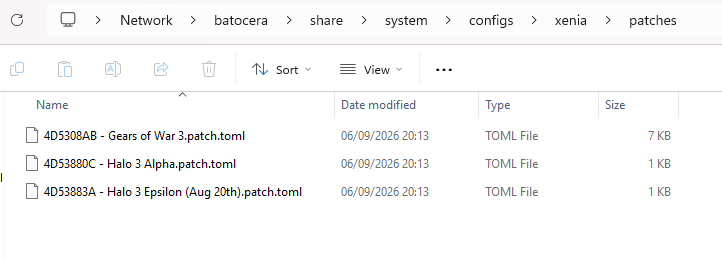
The Xbox 360 side of this project is at an earlier stage than the PS3 testing above, but I’ve got Xenia Canary properly set up and both Halo 3 and Gears of War 3 running with the correct community patches applied.
Getting the patches installed:
- Download the relevant
.patch.tomlfile for each game from the official xenia-canary/game-patches repository — for Halo 3 specifically, that was the “Halo 3 Epsilon (Aug 20th)” patch file. - Copy the downloaded patch files into Xenia’s patches folder under its config directory in /userdata/system/configs/xenia/patches/.
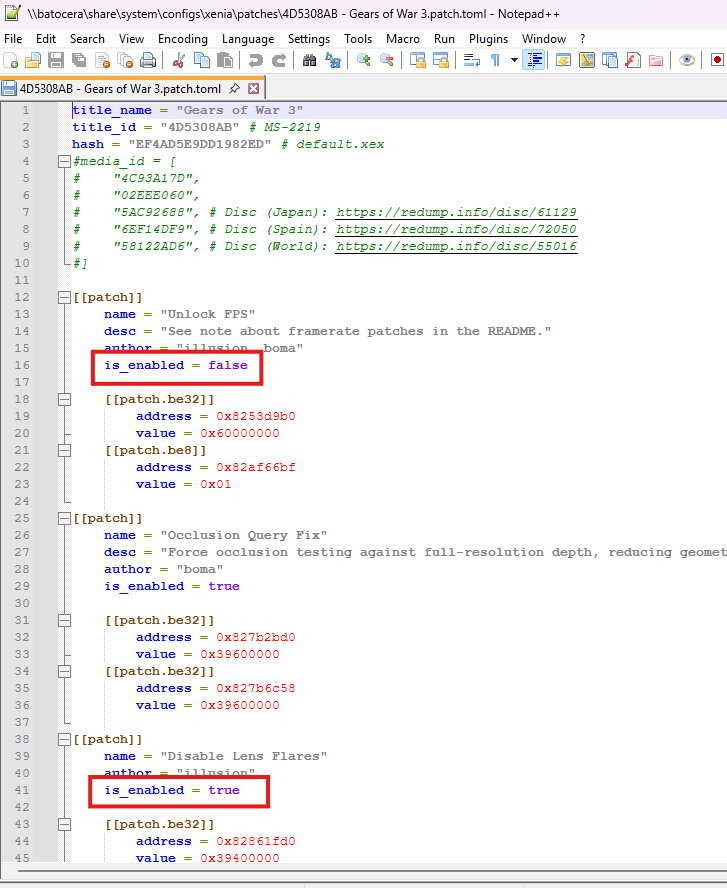
- Open each individual
.patch.tomland setis_enabled = truefor whichever specific patches you want active, rather than leaving them all off by default.
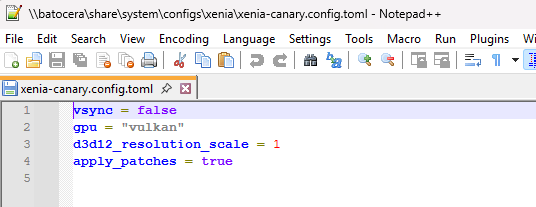
The Xenia Canary config changes, made by editing xenia-canary.config.toml directly:
vsync = false
gpu = "vulkan"
d3d12_resolution_scale = 1
apply_patches = true
apply_patches = true is the one that actually makes RPCS3-style per-game patches take effect at all — without it, every individual patch’s is_enabled = true setting is ignored regardless of what’s toggled inside the patch files themselves.
Results so far: both games are working correctly with this setup, though performance isn’t great overall — this is clearly the newer, less mature side of this build compared to the PS3 testing above, and I’d treat these as early results rather than a final verdict on what this hardware can do with Xbox 360 titles.
Halo 3 was the better of the two — genuinely playable, though it still froze a handful of times during longer sessions, so I wouldn’t call it fully stable yet.
I’d also planned to get the on-screen performance HUD working for Xenia, the same way I did for RPCS3 back in Part 6, but ended up abandoning that effort. Once it was clear the games weren’t performing well even after applying most of the available patches, chasing down FPS overlay numbers stopped feeling like a good use of time — there wasn’t much point instrumenting a result I already knew wasn’t great.
The overall picture, comparing the two platforms directly: Xbox 360 emulation on this build is noticeably harder to configure than PS3, and the results reflect that — PS3 has better compatibility overall and more titles that are genuinely playable without a fight. Getting PS3 working as well as it has in this build is a real win on its own; Xbox 360 still has a way to go before I’d say the same about it.
Summary So Far
| Game | Status | My result on this hardware |
|---|---|---|
| Burnout Paradise | Playable | 30–60fps, no issues |
| Red Dead Redemption | — | 12–15fps in busy areas, heavy judder; the roughest result of the run |
| Assassin’s Creed II | Ingame | Stable 30fps, no crashes or artifacts seen |
| God of War III | Not Playable | 20–30fps, played very well overall |
| Army of TWO: The Devil’s Cartel | Ingame | Unplayable — stopped testing here |
| Army of TWO: The 40th Day | Playable | Startup video judder only; smooth in actual gameplay |
| Prince of Persia: The Forgotten Sands | Playable | Stable 30fps |
| Tekken 6 / Super Street Fighter IV / TMNT: Turtles in Time Re-Shelled | Playable | Stable 60fps across all three, no configuration needed |
| Gran Turismo 6 | — | Unplayable — screen flicker persisted |
What’s Next?
That’s the real substance of this project — a genuine mix of results, from real surprises (God of War III and AC2 both playing far better than their official status suggests) through to titles that clearly aren’t there yet (Devil’s Cartel, GT6) and one that pushed this hardware to its actual limit (RDR). Xbox 360 tells a different story: harder to configure, less compatible overall, and the results show it — but getting PS3 emulation working this well is a genuine win for this build.
Part 8 brings everything together: the complete final hardware list, total build cost, and an honest look at what worked, what didn’t, and whether this project was actually worth doing.
That’s next.